Swipe to Wipe – Photo Cleanup
AI Cleaner & Free Storage

Free iPhone app · Utilities · by GREWON TECHNOLOGIES PRIVATE LIMITED · version 2.0 · 102.6 MB · requires iOS 16.6 or later · rated 4+
3.8 out of 5 from 4 App Store ratings.
Download Swipe to Wipe – Photo Cleanup on the App Store
About Swipe to Wipe – Photo Cleanup
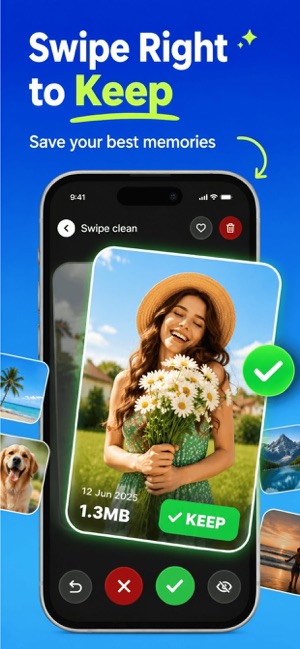
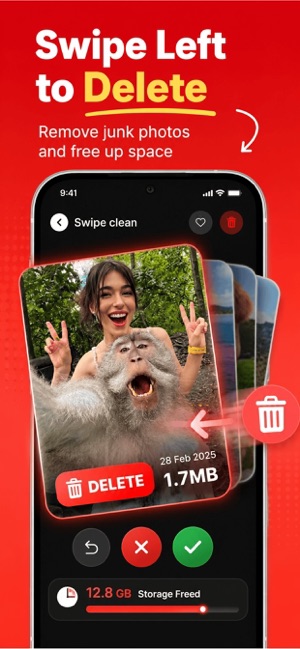
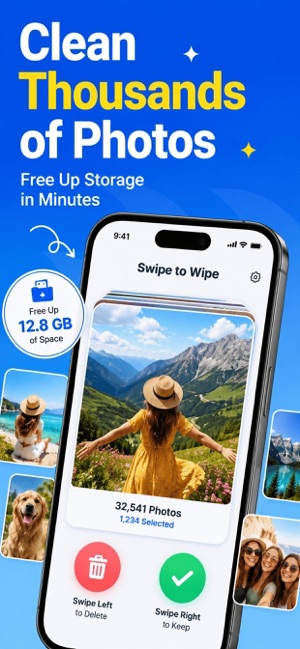
Swipe to Wipe – Photo Cleanup is the ultimate photo cleaner and storage optimizer for your iPhone. Declutter your camera roll & gallery clean up in seconds with intuitive swipewipe gestures—swipe left to delete a photo, swipe right to keep the ones you love. Free up storage, speed up your phone, and enjoy our intelligent AI Cleaner magic.
Key Features:
• Declutter gallery & album – Instantly remove duplicates, blurry shots, and unwanted images.
• Save storage – Reclaim space by deleting large, similar, or redundant photos.
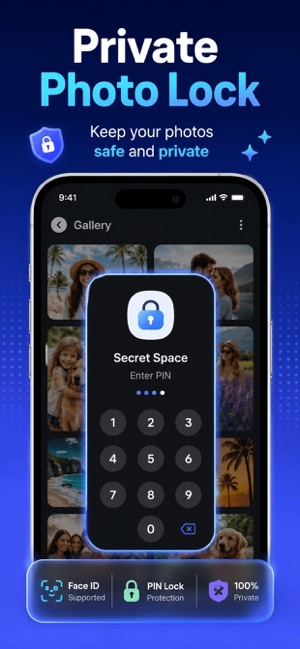
• Hidden & Protected – Secure private photos in a hidden vault.
• One-tap cleanup – Clean entire albums in a single tap.
Why You’ll Love Photo Cleaner:
• Swipe-driven ease – No complex menus; just swipe to sort.
• Smart suggestions – Our AI Cleaner highlights the best shots.
• Photo organizer – Keep your memories neat and accessible.
• Camera roll cleaner – Stop scrolling forever—cleanup is instant.
• Album cleaner – Target specific albums for quick results.
Join thousands who’ve transformed their photo libraries. Download Swipe to Wipe – Photo Cleanup now and start decluttering your camera roll with zero effort!
Subscribe to get Pro access to all features. You will be charged after the purchase confirmation. Subscriptions auto-renew 24 hours before the expiration date. You can manage your subscriptions in Account Settings on the App Store.
Privacy Policy: https://sites.google.com/view/swipe-to-clean/privacy-policy
Terms & Conditions: https://sites.google.com/view/swipe-to-clean/terms-conditions
Key features
- Declutter gallery & album – Instantly remove duplicates, blurry shots, and unwanted images.
- Save storage – Reclaim space by deleting large, similar, or redundant photos.
- Hidden & Protected – Secure private photos in a hidden vault.
- One-tap cleanup – Clean entire albums in a single tap.
- Swipe-driven ease – No complex menus; just swipe to sort.
- Smart suggestions – Our AI Cleaner highlights the best shots.
- Photo organizer – Keep your memories neat and accessible.
- Camera roll cleaner – Stop scrolling forever—cleanup is instant.
- Album cleaner – Target specific albums for quick results.
What's new in version 2.0
Improved performance, smoother swipes, and faster photo cleanup.
Screenshots

Ratings and reviews
3.8 out of 5 from 4 App Store ratings.
No written reviews yet. Be the first to review it on the App Store.
Information
- Developer
- GREWON TECHNOLOGIES PRIVATE LIMITED
- Category
- Utilities
- Price
- Free
- Size
- 102.6 MB
- Languages
- English, French, German, Hindi, Indonesian, Italian, Japanese, Korean, Portuguese, Russian, Simplified Chinese, Spanish, Thai, Turkish
- Age rating
- 4+
- First released
- 2025-03-06
- Last updated
- 2026-06-16
- Privacy policy
- https://sites.google.com/view/swipe-to-clean/privacy-policy
Frequently asked questions
What is Swipe to Wipe – Photo Cleanup?
Swipe to Wipe – Photo Cleanup is the ultimate photo cleaner and storage optimizer for your iPhone. AI Cleaner & Free Storage.
Is Swipe to Wipe – Photo Cleanup free?
Yes, Swipe to Wipe – Photo Cleanup is free to download on the App Store. Check the listing for optional in-app purchases.
Which devices does Swipe to Wipe – Photo Cleanup support?
iPhone Requires iOS 16.6 or later. Mac Requires macOS 13.5 or later and a Mac with Apple M1 chip or later. Apple Vision Requires visionOS 1.0 or later.
Which languages does Swipe to Wipe – Photo Cleanup support?
14 languages, including English, French, German, Hindi, Indonesian, Italian, Japanese, Korean and more.
Who makes Swipe to Wipe – Photo Cleanup?
Swipe to Wipe – Photo Cleanup is developed by GREWON TECHNOLOGIES PRIVATE LIMITED. Website: https://adxsdk.com/.
What's new in Swipe to Wipe – Photo Cleanup?
Version 2.0 (updated 2026-06-16): Improved performance, smoother swipes, and faster photo cleanup.
 Water Eject: Sonic Speaker
 TextUtils: Tools & Generators
 Speedometer: Speed Meter GPS
 Metal Detector: Stud Finder